Family Tree |
|
|
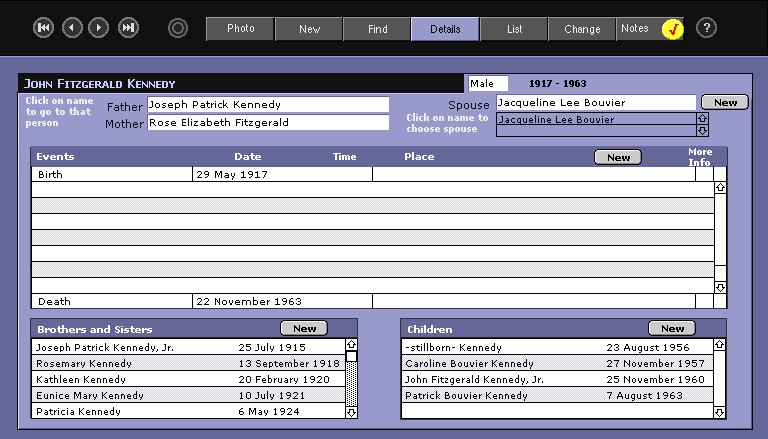
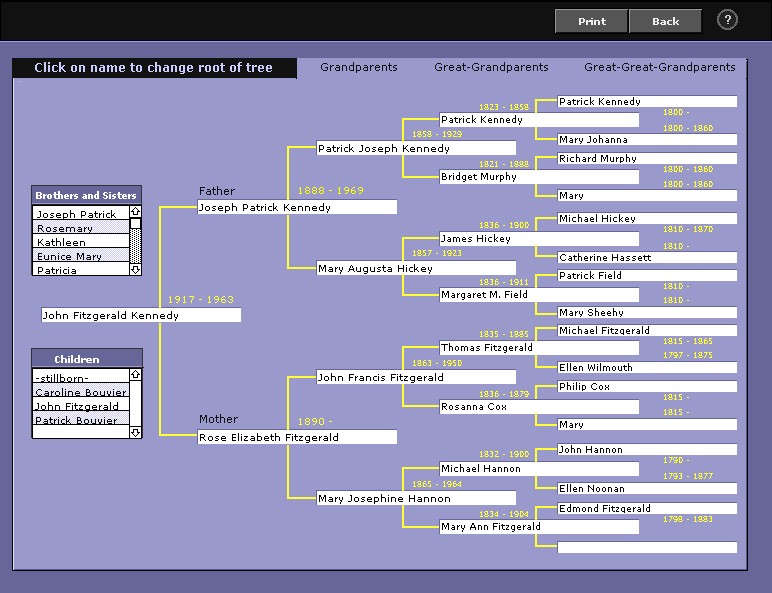
The family tree program (name not yet finalized) allows one to construct a basic family tree, with as little or as much information as one wants to input. When the information cannot be easily cateqorized, it can be entered into one of the notes fields (general notes associated with the individual or event notes related to an event in the individual's life). The main information screen is where most of the actual work is done. Although compact, it contains most of the information for a particular individual (or links to more information). In addition to information about the person herself, the name of the parents (if known), brothers and sisters (including step-brothers and sisters), spouse (s) and children. Any one of these names can be clicked, taking the user to the record of the person clicked. If the father, mother, or spouse are not present, clicking the blank field allows the user to enter the name of that person. If the person named is already in the database, the program checks for duplicates and allows the user to choose a person already entered (all links for that person will be updated). All event information relates only to the particular individual whose information screen you are on. This is true even for events such as emigration which usually involve more than one person (the programmer is working on making events such as this apply to more than one person, but for now, they have to be entered separately for each individual concerned). There is one exception to this rule - marriages. A marriage event will always have two persons involved, and the marriage event will appear on the screens of both marriage partners (the information can be entered from the screen of either partner). Clicking on the name of the main individual (or selecting Family Tree as an option from the Script menu) will bring you to the ancestral tree of that individual. This tree pictures the main individual and four previous generations for that individual. Just as on the main information screen, clicking on any other name on this screen moves that person to the "root" of the tree and will then show the 4 previous generations of that person. Clicking on a brother, sister, or child will put them at the root of the tree. One can move around on this screen and gain much information concerning the structure of the family and how everybody is related. If the user clicks the "Print" button on this screen, the entire family tree will be printed, using as many pages as necessary to provide all the information. On the print screen, each page is numbered, and after the names of the great-great-grand parents a page number is printed showing the page where that particular tree is continued. Each printed page shows 4 earlier generations, just as the screen itself shows. A printout can be particularly valuable for a family tree going back many generations, where it becomes difficult at a certain point to keep track of where everybody fits. A word of warning, however. If the family tree is extensive, this printout can take a bit of time and can also run many pages (I have seen a couple in the range of 30-50 pages in size). The programmer currently has a working version with nearly 7,000 names in the database and the program appears to be working flawlessly. |
|
|
|
|
|